

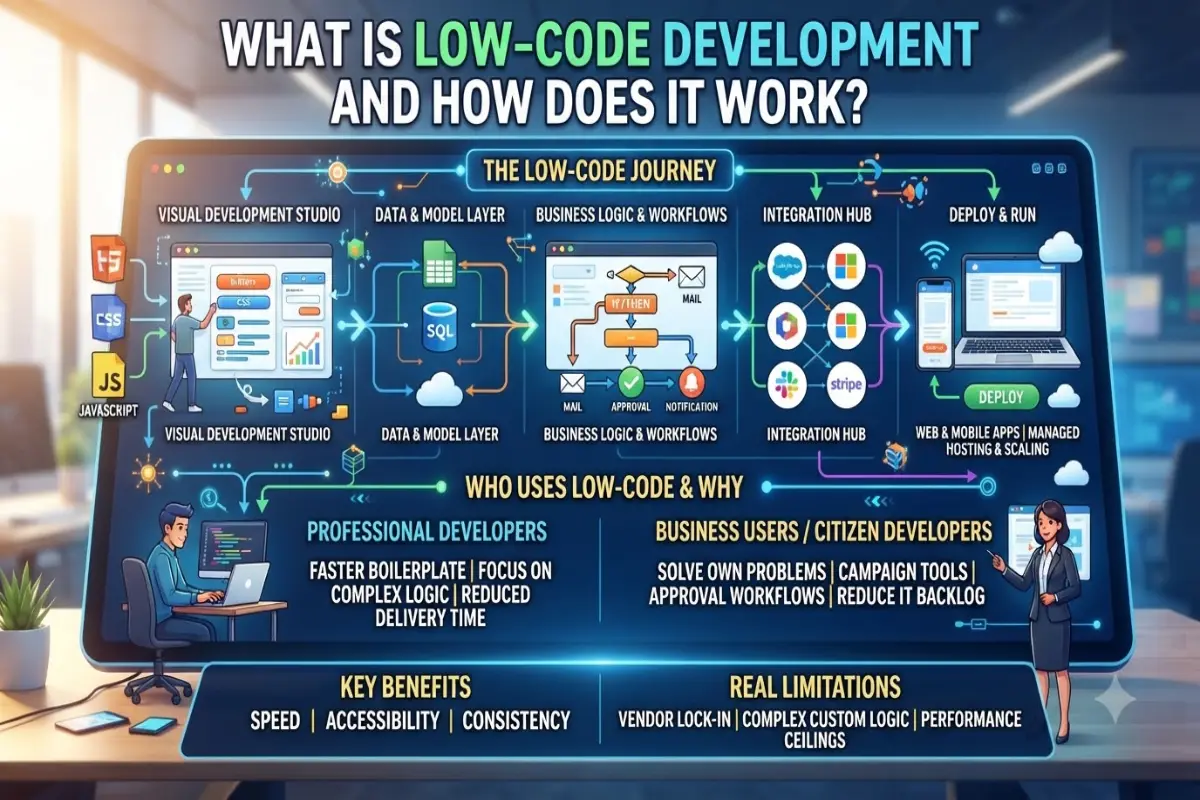
Low-code development is a way to build software applications using mostly visual tools instead of writing large amounts of traditional code by hand. You drag and drop components, connect data sources, set up workflows through simple diagrams, and only write small pieces of code when something unique is needed.
It sits between full traditional coding and pure no-code tools. No-code platforms let people with zero programming knowledge build simple apps completely through point-and-click interfaces. Low-code still uses visual building for most of the work but keeps an “escape hatch” so professional developers can add custom code when the visual tools reach their limits. That mix makes it useful for both business users and experienced developers.
The idea is not brand new. It grew out of earlier rapid application development tools and fourth-generation languages from the 1990s and 2000s. The term “low-code” became popular around 2014. By 2026 the market has grown into a major category. Analysts such as Gartner estimate the low-code technologies market at roughly $44–45 billion in 2026, with continued strong growth expected. Many reports also note that a large share of new enterprise applications are now built at least partly with low-code or no-code approaches.
How Low-Code Actually Works
Most low-code platforms share a similar set of building blocks.
First comes a visual development studio. This is a drag-and-drop canvas where you design screens, forms, dashboards, and layouts. Instead of writing HTML, CSS, or JavaScript for every button and table, you place ready-made components and arrange them. Changes appear immediately, which makes the process feel closer to designing than traditional coding.
Next is the data and model layer. You define what information the app needs—customers, orders, tasks, products—through visual tools. You set relationships between these pieces of data without writing complex database scripts in most cases. Many platforms include their own database or connect easily to existing ones such as SQL servers, cloud storage, or spreadsheets.
Business logic and workflows form the third piece. Instead of long blocks of code for “if this happens, then do that,” you usually draw flowcharts or use rule builders. You can set conditions, approvals, notifications, loops, and automated actions. The platform turns these visual rules into working logic behind the scenes.
Integration tools come next. Low-code platforms ship with many pre-built connectors for common systems—email, CRM tools, payment services, cloud storage, and internal company systems. You can also call custom APIs when needed. This is one of the biggest practical advantages: connecting systems that used to take weeks of custom work can often be done in hours.
Finally there is deployment and runtime. Once the app looks ready, most platforms let you publish it with a few clicks to web, mobile, or both. The platform handles hosting, scaling, security updates, and basic monitoring in many cases. Some support one-click deployment to private clouds or on-premises environments for stricter company requirements.
Professional developers can still open the hood. When a visual component is not enough, they can write JavaScript, Python, C#, or whatever language the platform supports, or extend the system with custom modules. That flexibility is what separates low-code from pure no-code.
Who Uses Low-Code and Why
Two main groups use these tools.
Professional developers use low-code to move faster on standard parts of an application. They spend less time on boilerplate screens, basic CRUD operations, and routine integrations, and more time on the complex or unique logic that really needs custom code. Many report cutting delivery time significantly for internal tools and departmental applications.
Business users and “citizen developers” (people whose main job is not software development) use low-code to solve their own problems. A marketing manager might build a campaign tracking tool. An operations team might create a simple approval workflow. When done under proper IT governance, this reduces the backlog of requests sitting with the central development team.
Companies adopt low-code for several practical reasons. Speed is the most obvious: projects that once took months can often ship in weeks. Cost is another—fewer specialized developers are needed for many applications, and maintenance is often lighter because the platform handles a lot of the underlying infrastructure. Consistency and governance also improve when teams work inside a controlled platform rather than building one-off solutions that become hard to maintain.
Common Use Cases
Low-code works especially well for certain kinds of applications:
- Internal business tools and admin panels
- Workflow and approval systems
- Customer or employee portals
- Simple to moderately complex departmental applications
- Rapid prototypes and minimum viable products
- Line-of-business apps that need to integrate with existing enterprise systems
It is less ideal for highly specialized systems that demand extreme performance, unique algorithms, or very tight control over every layer of the technology stack. Heavy computational work, complex real-time graphics, or systems that must run in highly constrained environments still tend to need traditional coding.
Popular Platforms in 2026
The market includes both general-purpose and specialized tools. Enterprise-focused platforms such as OutSystems, Mendix, Microsoft Power Apps, Appian, ServiceNow, and Salesforce often appear as leaders in analyst reports. These emphasize scalability, security, governance, and integration with large company systems.
Other tools focus more on internal tools or faster business-user experiences. The exact choice depends on whether the priority is deep enterprise integration, ease for non-developers, mobile support, or cost.
AI features have become common. Many platforms now offer AI assistants that can suggest layouts, generate workflow steps from plain-language descriptions, or help create data models. These features speed things up further but still require human judgment and testing.
Benefits and Real Limitations
The biggest benefits are speed, accessibility, and reduced maintenance overhead for many types of applications. Teams can respond faster to business needs. Non-developers can contribute productively under the right structure. Professional developers can focus on higher-value work.
Limitations exist. Complex custom logic can still require significant coding, and some platforms make that coding feel constrained. Vendor lock-in is a real concern—moving an application off a platform later can be difficult and expensive. Performance and scalability have improved a lot but still have ceilings compared with carefully optimized custom systems. Security and compliance need careful attention; platforms provide strong foundations, but configuration mistakes or weak governance can create risks.
Good results usually come from treating low-code as one tool among several, not as a complete replacement for traditional development. Many organizations now use a mix: low-code for internal tools and standard processes, traditional code for core products and highly specialized systems.
Getting Started
If you want to try low-code, begin with a clear, limited problem. Map the current process on paper first. Choose a platform that matches your environment (for example, one that already connects well to the systems your company uses). Start with templates when they exist. Build the data model carefully, then the screens, then the workflows. Test with real users early. Add custom code only when the visual tools clearly fall short.
Governance matters. Even citizen developers need guidelines on data access, security standards, and how finished applications will be maintained. Without that structure, low-code can create a new form of shadow IT.
Looking Ahead
Low-code is no longer experimental. It has become a standard part of how many organizations deliver applications. The combination of visual tools, strong integrations, better governance features, and growing AI assistance continues to expand what is practical to build this way.
It does not eliminate the need for skilled developers. Instead it changes where their effort goes. Routine work becomes faster, more people can contribute, and the overall capacity of a development organization increases. For many everyday business applications, low-code is simply a more practical way to get useful software into people’s hands without the full cost and time of traditional development.
The key is matching the tool to the problem. When the requirements fit what low-code does well, the results can be dramatically faster and more collaborative. When the problem is highly specialized, traditional coding still wins. Understanding that difference is the real skill.
