

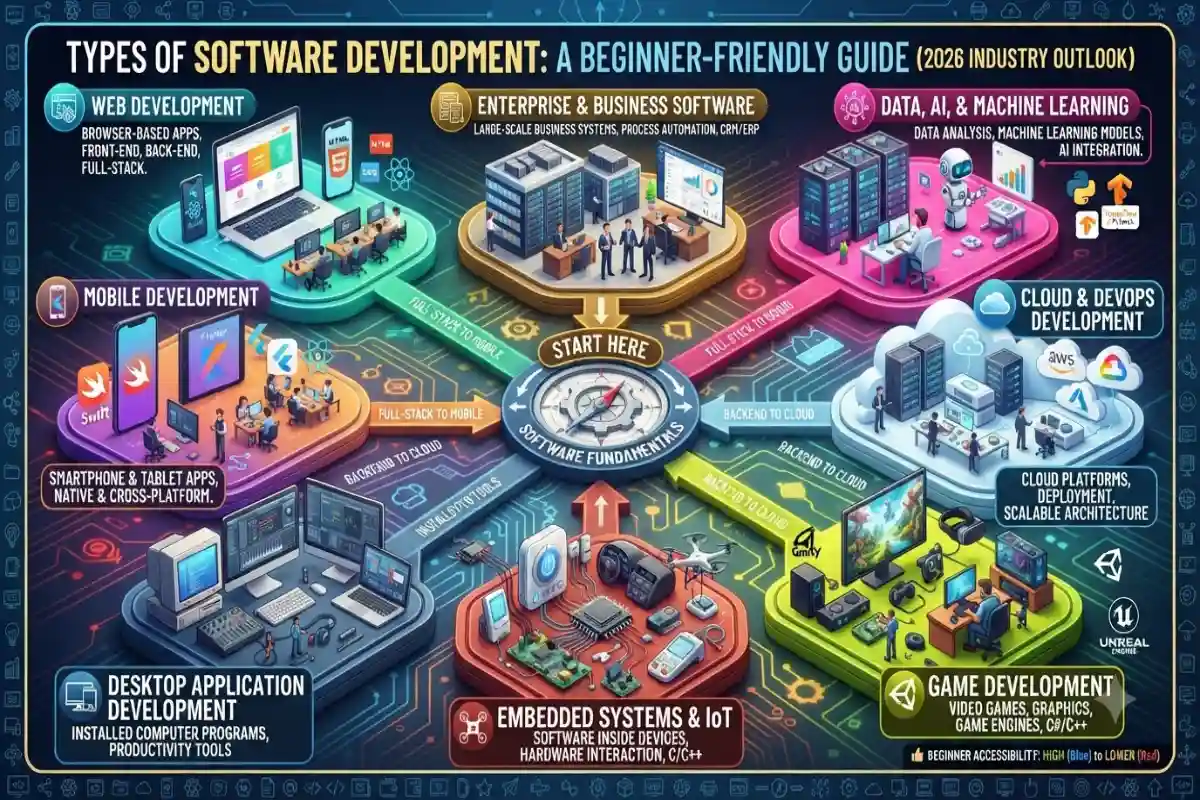
Software development is not one single job. It’s a big field with different specializations, just like how “doctor” can mean a family doctor, a surgeon, or a heart specialist. Each type focuses on different platforms, tools, and problems.
This guide walks through the main types in plain language so beginners can understand what they actually involve and which ones might fit their interests. We’ll keep it practical and based on how the industry looks in 2026.
Why Knowing the Types Matters
When people say “I want to learn software development,” they often mean different things. Some want to build websites. Others want to make phone apps. Some are interested in the software inside cars or medical devices. Knowing the categories helps you pick a starting path, choose the right learning resources, and understand job descriptions later.
Most real projects mix several types. A modern app might have a web front-end, a mobile version, a cloud backend, and some AI features. Still, developers usually specialize in one or two areas.
1. Web Development
This is the most common entry point for beginners.
Web development is about building websites and applications that run in a browser. You access them through Chrome, Safari, Firefox, etc. No need to download anything from an app store.
It splits into three main parts:
- Front-end — What the user sees and clicks on (buttons, layouts, forms). Uses HTML, CSS, and JavaScript (plus frameworks like React or Vue).
- Back-end — The server side that handles data, logins, payments, and business logic. Common languages include JavaScript (Node.js), Python, Java, or C#.
- Full-stack — People who work on both sides.
In 2026 web development is still the largest area. Almost every business needs a website or web app. Progressive Web Apps (PWAs) also blur the line with mobile because they can work offline and feel more like native apps.
Good for beginners because free tools are everywhere and you can see results quickly in a browser.
2. Mobile Development
This is about apps that run on smartphones and tablets.
There are two main approaches:
- Native — Built specifically for one platform. Swift or Objective-C for iOS (Apple). Kotlin or Java for Android (Google). These usually give the best performance and access to device features.
- Cross-platform — Write the code once and run it on both iOS and Android. Popular tools in 2026 are Flutter (from Google) and React Native (from Meta).
Many companies start with cross-platform to save time and money, then go native for performance-critical parts.
Mobile development is popular because so many people use phones as their main computer. You’ll deal with app store rules, different screen sizes, and device permissions (camera, location, notifications).
3. Desktop Application Development
These are programs that install and run directly on a computer (Windows, macOS, or Linux).
Examples: Microsoft Word, Adobe Photoshop, Slack desktop app, or specialized tools used in offices and factories.
Languages and frameworks vary a lot — C#, Electron (which uses web technologies), Java, or native tools for each operating system. Some desktop apps are moving to the web, but many still need local power or offline access.
This area is smaller than web or mobile for new developers, but it remains important for professional software and certain industries.
4. Embedded Systems and IoT Development
This is software that lives inside physical devices.
Think of the code in a smart thermostat, a car’s engine control unit, a medical monitor, a drone, or industrial machinery. It often has to work with limited memory and power, and it must be very reliable because updating it later can be hard or impossible.
Common languages include C and C++. You also need to understand hardware basics. In 2026 the Internet of Things (IoT) continues to grow, so more devices need this kind of software.
This path is more technical and less beginner-friendly at the start, but it can lead to interesting work in automotive, healthcare, and manufacturing.
5. Game Development
Building video games — from simple mobile games to big console titles.
It involves graphics, physics, sound, user input, and storytelling. Most people use game engines rather than writing everything from scratch. Unity (C#) and Unreal Engine (C++) are the two biggest. There are also lighter options for 2D games.
Game development has its own culture and can be very competitive. Many people start with small personal projects or game jams (short collaborative events).
6. Cloud and DevOps-Related Development
This focuses on building software that runs on cloud platforms (AWS, Microsoft Azure, Google Cloud) and the tools that help teams deploy and maintain it reliably.
DevOps is more of a culture and set of practices than a pure coding specialty, but many developers work on infrastructure-as-code, continuous integration/continuous delivery (CI/CD) pipelines, monitoring systems, and scalable architectures.
In 2026 almost every serious web or mobile product relies on cloud services, so these skills are in high demand.
7. Data, AI, and Machine Learning Development
This area has grown a lot.
It includes:
- Building systems that process and analyze large amounts of data
- Creating machine learning models
- Integrating AI features into regular applications (chatbots, recommendation systems, image recognition, etc.)
Python is the dominant language here. You often work with libraries like TensorFlow, PyTorch, or scikit-learn, plus data tools and cloud AI services.
Not every AI project needs deep research-level skills. Many developers just call existing AI APIs and build the surrounding application. That makes it more accessible than pure research roles.
8. Enterprise and Custom Business Software
Large companies need specialized systems for accounting, inventory, customer management (CRM), human resources, supply chain, and more.
These are often complex, long-lived applications with lots of integrations, security requirements, and compliance rules. Technologies can include Java, .NET, SAP-related tools, or modern cloud platforms.
Work here tends to be more structured and process-heavy than startup-style web or mobile projects.
Quick Comparison Table
| Type | Main Platform | Typical Languages / Tools | Beginner Accessibility | Common Use Cases |
| Web | Browsers | HTML, CSS, JS, React, Node, Python | High | Websites, SaaS, online stores |
| Mobile | Phones & tablets | Swift, Kotlin, Flutter, React Native | Medium | Consumer apps, banking, social |
| Desktop | Computers | C#, Electron, Java | Medium | Productivity tools, professional software |
| Embedded / IoT | Devices & hardware | C, C++ | Lower | Cars, medical devices, smart home |
| Game | Consoles, PC, mobile | C#, C++, Unity, Unreal | Medium | Entertainment, simulations |
| Cloud / DevOps | Cloud servers | Various + infrastructure tools | Medium-High | Scalable apps, deployment pipelines |
| AI / Data | Servers & cloud | Python + ML libraries | Medium | Recommendations, automation, analytics |
| Enterprise | Internal systems | Java, .NET, specialized platforms | Medium | Business operations, large organizations |
Other Related Areas
You’ll also hear about:
- API development — Building the interfaces that let different systems talk to each other.
- Security-focused development — Writing software with strong protection against attacks (or testing for weaknesses).
- Blockchain / Web3 — Decentralized applications (smaller niche in 2026 than a few years ago).
- AR/VR development — Software for augmented and virtual reality experiences.
These often overlap with the main types above.
How to Choose a Starting Point
If you’re brand new:
- Start with web development (especially front-end). You can see results fast and the free learning resources are excellent.
- If you love phones and apps, try mobile with Flutter or React Native after learning some JavaScript or Dart basics.
- If you’re curious about AI, learn Python first, then explore data and machine learning libraries.
- If hardware and low-level systems interest you, look at embedded after you have solid programming fundamentals.
Many people begin in one area and later move or expand into others. Full-stack web developers often pick up mobile skills. Backend developers sometimes move into cloud and DevOps. The fundamentals (logic, problem-solving, version control, testing) transfer well.
Current Trends Affecting the Types (2026)
AI coding assistants are used across almost every type now. They speed up writing and testing code, but they don’t replace the need to understand systems and catch mistakes.
Cross-platform tools keep improving for mobile. Cloud services make it easier to launch web and backend projects without managing physical servers. Demand remains strong for people who can combine traditional development skills with AI tools and good communication.
Final Types of Software DevelopmentThoughts
The different types of software development exist because software runs in many places and solves many kinds of problems. Web and mobile are the most accessible for beginners and still offer plenty of opportunities. Embedded, game, and specialized enterprise work tend to require more specific knowledge.
You don’t have to pick one forever on day one. Most developers explore a bit, build projects, and then settle into the areas they enjoy and are good at. The important part is starting with solid basics and building real things, no matter which type you choose first.
This overview should give you a clear map of the main paths so you can decide where to begin your own learning.
